A product in its own right
Package a focused checklist, field guide, blueprint, prompt sheet or troubleshooting guide as a small digital product.
Example: “The First 30 Days Email List Checklist”Create polished visual resources you can sell as small digital products, offer as lead magnets, include as affiliate bonuses or use with courses, content and clients — without Canva, design skills or an OpenAI API key.
One-time purchase via WarriorPlus Use with your existing ChatGPT account
A QuickSheet is simply useful information shaped into a focused, visual resource. Create one around knowledge you already have, then use it wherever a short, valuable document makes sense.
Package a focused checklist, field guide, blueprint, prompt sheet or troubleshooting guide as a small digital product.
Example: “The First 30 Days Email List Checklist”Give prospects a genuinely useful quick win in exchange for joining your email list, without writing a full ebook.
Example: “10 Checks Before You Send a Campaign”Create an original companion resource that helps buyers understand, start or get more organised with the product you promote.
Always follow the vendor’s bonus and branding rules.Turn a lesson into a reference sheet, action checklist, framework or summary members can keep beside them.
Example: a one-page module implementation planProvide onboarding instructions, preparation checklists, process guides, aftercare notes or branded reference materials.
Example: “What to Prepare Before Our Strategy Call”Add a downloadable worksheet, summary or action guide to an article, video, webinar, podcast or presentation.
Example: a printable checklist matched to one tutorialA practical demonstration of the QuickSheet AI workflow and the choices available inside the software.
ChatGPT can create impressive documents, but vague requests tend to produce vague results: long paragraphs, weak hierarchy, random decoration and copy that feels more like an article than a quick-reference tool.
Getting a genuinely useful document means making dozens of decisions about structure, audience, purpose, density, page count, visual style, accuracy and output format.
QuickSheet AI turns those decisions into one coherent, purpose-built master prompt.
“Make a cheat sheet about email marketing.”QuickSheet AI assembles only the instructions relevant to your choices. A checklist receives checklist logic. A paid product receives premium-product guidance. A technical style receives structured panels and diagram instructions.
The result reads like a thoughtful brief from an information designer, editor and document-layout specialist working together.
Format-specific structures for checklists, blueprints, comparisons, glossaries and more.
Different priorities for lead magnets, client resources, paid products and course handouts.
Clear direction for hierarchy, typography, cards, tables, diagrams, spacing and print layout.
Guardrails against fabricated claims, statistics, citations, recommendations and URLs.
You do not need to learn prompt engineering or document design first.
Add your niche, topic and audience. Pick the document type, purpose and visual style.
QuickSheet AI combines the right content, design, branding and accuracy instructions.
One click copies the prompt and opens ChatGPT. Paste it, send it and let ChatGPT create the artifact.
Each format changes the prompt’s underlying information architecture.
Facts, definitions, reminders and key information optimised for fast lookup.
Clear, actionable checks grouped and ordered for practical use.
A visual workflow from the starting point to the desired outcome.
A named model with connected components and practical interpretation.
Meaningful criteria arranged side by side without invented specifications.
Problem, possible cause and recommended fix in a useful reference structure.
Complete reusable prompts with a purpose and customisation notes.
Practical templates, formulas, scripts and examples ready to adapt.
Also includes Beginner Guide, Glossary, Resource Sheet and Custom formats.
Choose the visual treatment that fits the audience, purpose and value of the document you want to create.
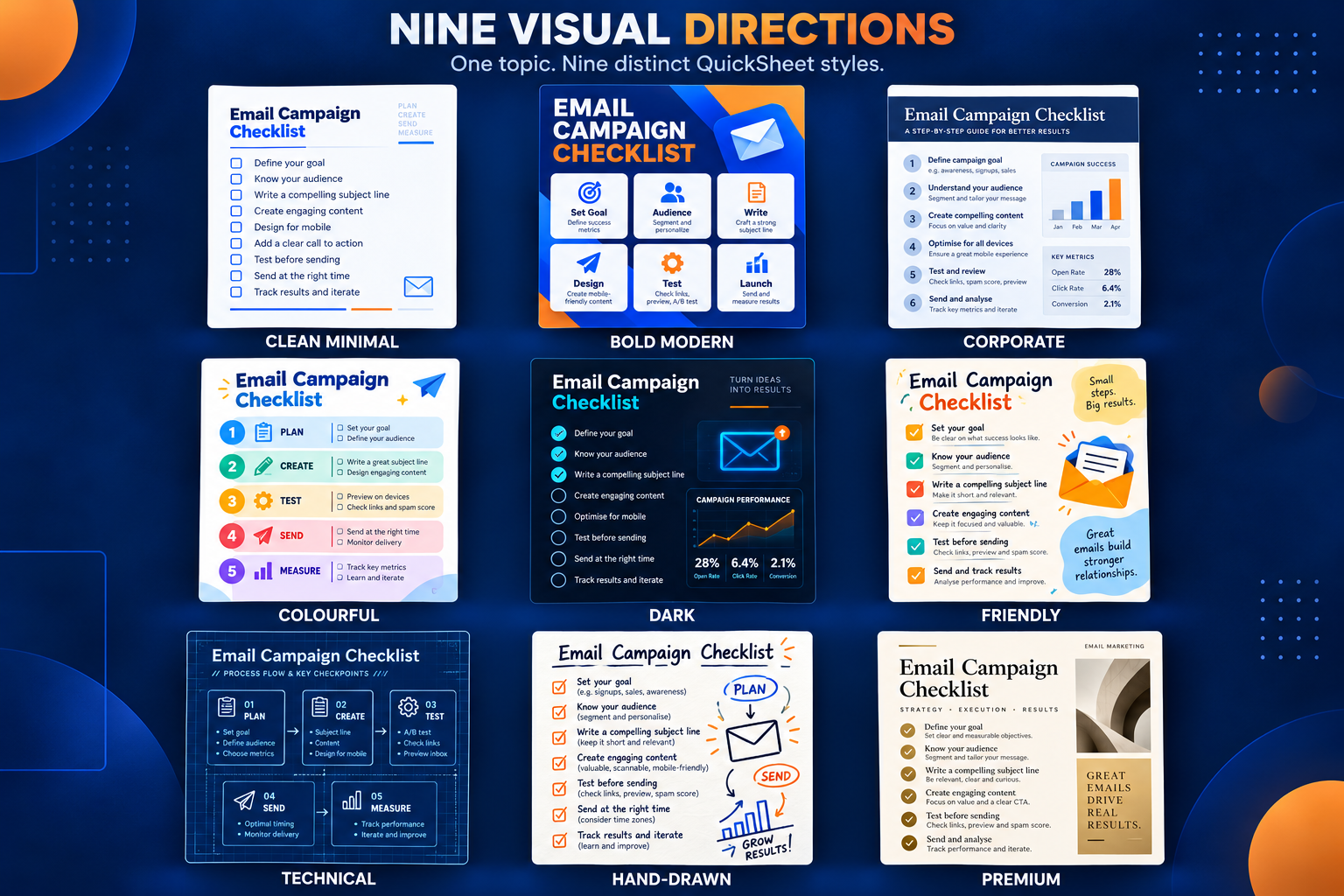
Choose the useful constraints. QuickSheet AI translates them into clear instructions without forcing every option into every prompt.
Build a detailed, choice-aware prompt designed to help ChatGPT create a polished reference document.
Include structure, writing, visual-design, print-layout and accuracy instructions.
Call an AI API, consume QuickSheet AI credits or require you to configure an API key.
Generate the final PDF itself. ChatGPT creates the final artifact using the prompt you paste.
Build a proper visual-document brief, copy it into ChatGPT and move from rough topic to useful artifact with far less guesswork.
Secure payment processed by WarriorPlus
You could sell it as a focused digital product, offer it as a lead magnet, create an original affiliate bonus, add it to a course or membership, use it as a client handout, or pair it with an article, video, webinar or presentation as a content upgrade. You remain responsible for the content, rights, claims and any vendor or platform rules.
No. QuickSheet AI creates the detailed master prompt. You paste that prompt into ChatGPT, which then creates the finished document or best available editable artifact in its current environment.
No. QuickSheet AI does not call an AI API. It is designed to work with the ChatGPT account you already use.
No. ChatGPT is a separate service. Its features, limits and availability depend on your ChatGPT account and may change independently of QuickSheet AI.
Projects and settings are stored locally in your browser. There are no QuickSheet AI accounts or cloud sync in this version, so clearing browser data can remove saved projects.
Yes. You can add brand colours, a business name, website and call to action. You can also tell the prompt that you will attach a logo in ChatGPT before sending it.
Yes. The prompt includes accuracy guardrails, but AI output should still be reviewed. This is especially important for current, legal, medical, financial or scientific information.
ChatGPT creates the document.
Get QuickSheet AI